Quick answer: The clearest signs you need a new office chair are: the seat cushion has visibly sagged or lost its shape, the gas lift no longer holds height, the chair develops new creaks or wobble, you’re feeling new back or neck discomfort that wasn’t there before, and the adjustment controls (recline, lumbar, armrests) have stopped working. One sign is worth watching; two or more usually means it’s time to plan a replacement.
Key takeaways
- Most office chairs have a practical lifespan of several years, depending on daily use and build quality.
- Physical wear (sagging, squeaking, sinking) and physical symptoms (new discomfort) are both valid signals — you don’t need to wait for one to confirm the other.
- A chair that has lost its gas lift or tilt tension usually isn’t worth repairing — replacement is often more cost-effective.
- For an office-wide review, count the warning signs per chair rather than replacing everything on a fixed calendar date.
Why This Matters Before It Becomes a Bigger Problem
A chair rarely fails all at once. It wears down gradually — the foam compresses a little more each year, the gas lift starts drifting down under weight, a caster starts sticking — and because the change is slow, it’s easy to adjust around it without noticing the chair itself has become the problem.
That’s the case for a structured check rather than "I’ll replace it when it’s obviously broken." Below are five signs worth checking on every chair, whether you’re looking at one desk or planning a floor-wide refresh.
The Five Signs at a Glance
Sign | What it means | What to do |
|---|---|---|
Sagging or flattened seat | Foam has compressed permanently | Replace — foam doesn’t recover |
Gas lift won’t hold height | Cylinder is losing pressure | Replace — not worth repairing |
Creaks, wobble, instability | Frame, base, or caster wear | Replace — a safety risk on hard floors |
New back or neck discomfort | Chair no longer fits or supports you | Check the chair first; act if paired with wear |
Controls stopped working | Lost adjustability | Replace — it’s back to a basic seat |
Sign 1 — The Seat Cushion Has Sagged or Lost Its Shape
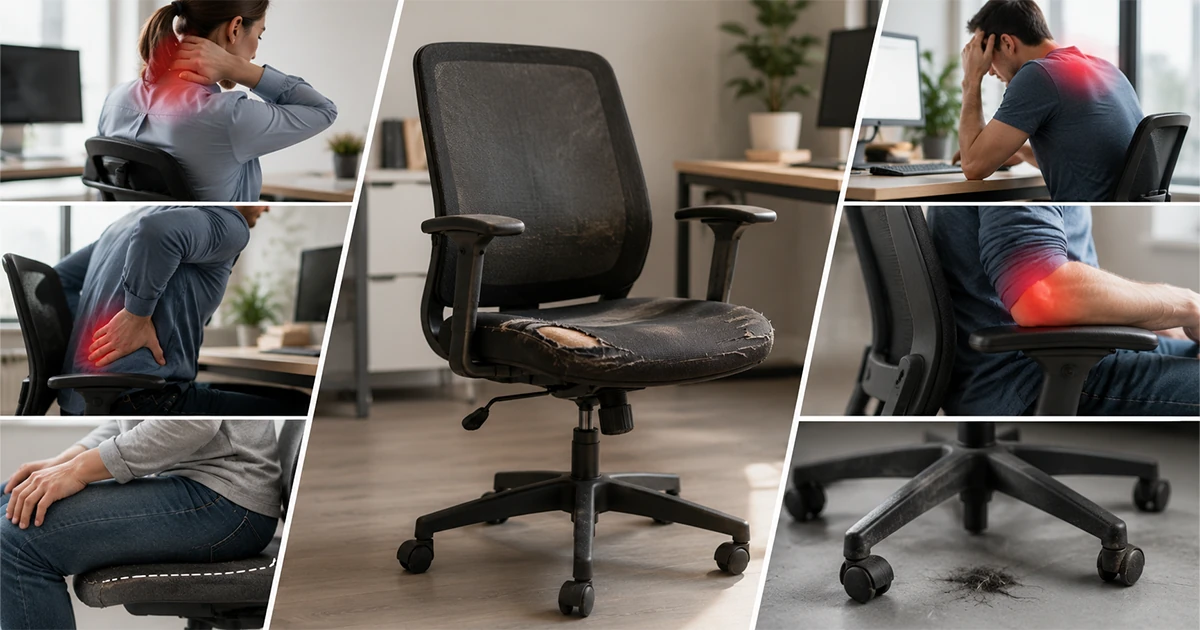
Sit in the chair and check whether the front edge of the seat has flattened, or whether you can feel the support frame through the foam. Foam compresses permanently with years of daily use, and once it’s compressed it doesn’t recover — even after time off the chair.
A sagging seat changes how your weight sits across your thighs and lower back, which is often the first thing people notice as new discomfort before they connect it back to the chair.
Sign 2 — The Gas Lift Doesn’t Hold Height
Set the chair to a height, then check an hour later whether it has sunk. A gas lift that slowly loses pressure under weight is a mechanical failure, not something you can adjust around — and it gets worse over time. This is one of the more common failure points on chairs used daily, since the cylinder takes constant load through the working day.
Sign 3 — New Creaks, Wobble, or Instability
A chair that creaks when you shift weight, wobbles on its base, or feels less stable than it used to is showing wear in the frame, casters, or base — not just the upholstery. This is a safety-relevant sign, not just a comfort one, especially for chairs on hard flooring where instability increases the risk of a fall.
Sign 4 — New Back, Neck, or Shoulder Discomfort at Your Desk
If discomfort during or after a work day is new — it wasn’t there before, and nothing else about your setup, hours, or health has changed — the chair is a reasonable first thing to rule out. It’s especially worth checking if the discomfort eases on days spent away from that desk.
This sign is easy to dismiss because it can have other causes. But paired with any of the physical wear signs above, it’s a strong combined signal that the chair, not just posture, is the issue.
Sign 5 — Adjustment Controls Have Stopped Working
Recline tension that no longer holds, a lumbar dial that spins without effect, or armrests that won’t stay at a set height all mean the chair has lost the adjustability that made it ergonomic in the first place. A chair stuck in one position is, in practice, back to being a basic seat.
How Many Signs Mean It’s Time to Replace
Quick answer: One sign — keep an eye on it. Two or more together, especially a mechanical failure (gas lift, recline, lumbar) plus new discomfort — it’s time to plan the replacement.
For an office-wide review, score each chair against these five signs and prioritise the chairs scoring highest, rather than replacing everything on a fixed multi-year calendar regardless of condition. This keeps replacement spending targeted at the chairs actually causing problems.
Replacing also resets the warranty clock — a new office chair typically carries cover of 1 to 5 years depending on the model, which a repaired older chair won’t.
Conclusion
None of these five signs is dramatic on its own, which is exactly why chairs tend to get replaced later than they should. Check for sagging, failing mechanisms, instability, and new discomfort together, and the picture usually becomes clear faster than expected.
Why Seatspace Replacing seating across an office is simpler with a specialist who can match new chairs to what you already have. Seatspace is a Riyadh-based office-seating specialist — local stock and hands-on support, nationwide delivery through our shipping partner Aramex, secure online checkout via PayTabs, and warranties ranging from 1 to 5 years depending on the chair. |
Noticed two or more of these signs across your office? Reach out to Seatspace for a project quote and a replacement recommendation matched to your seat count and budget.
Just replacing one chair? Browse Seatspace’s ergonomic office chairs to find a comfortable upgrade.
About the author SeatSPACE is an office-seating specialist based in Riyadh, Saudi Arabia, supplying and advising on ergonomic chairs for workplaces across the Kingdom. This guide was written and reviewed by the SeatSPACE team. |