Quick answer: An ergonomic workspace starts with the chair — feet flat, knees level with hips, lumbar supported — then builds outward: monitor top at eye level about an arm’s length away, elbows at roughly 90 degrees at the keyboard, and the desk positioned to avoid glare from Riyadh’s strong daylight rather than facing a window directly.
Key takeaways
- Chair setup comes first; every other adjustment (monitor, desk height, keyboard) is calibrated relative to a correctly seated position.
- Monitor position is the most commonly skipped step, and one of the biggest contributors to neck strain.
- In Riyadh offices, glare and heat near windows matter as much as square footage when placing a desk.
- A quick five-minute setup check per desk catches most of the common mistakes.
Start With the Chair, Not the Desk
Every other measurement in a workspace is calibrated relative to how you sit, so getting the chair right first makes the rest of the setup faster and more accurate.
- Adjust seat height so feet sit flat on the floor with knees roughly level with hips.
- Set seat depth so there are two to three finger-widths of space between the seat edge and the back of the knee.
- Position lumbar support to fill the curve of the lower back, not sit above or below it.
- Set armrests so shoulders stay relaxed and forearms can rest level with the desk.
Key takeaway: Set the chair first — every other measurement (monitor, desk, keyboard) depends on how you’re seated. A chair that can’t adjust to these points limits the whole setup.
Get the Monitor Position Right — It’s the Most Skipped Step
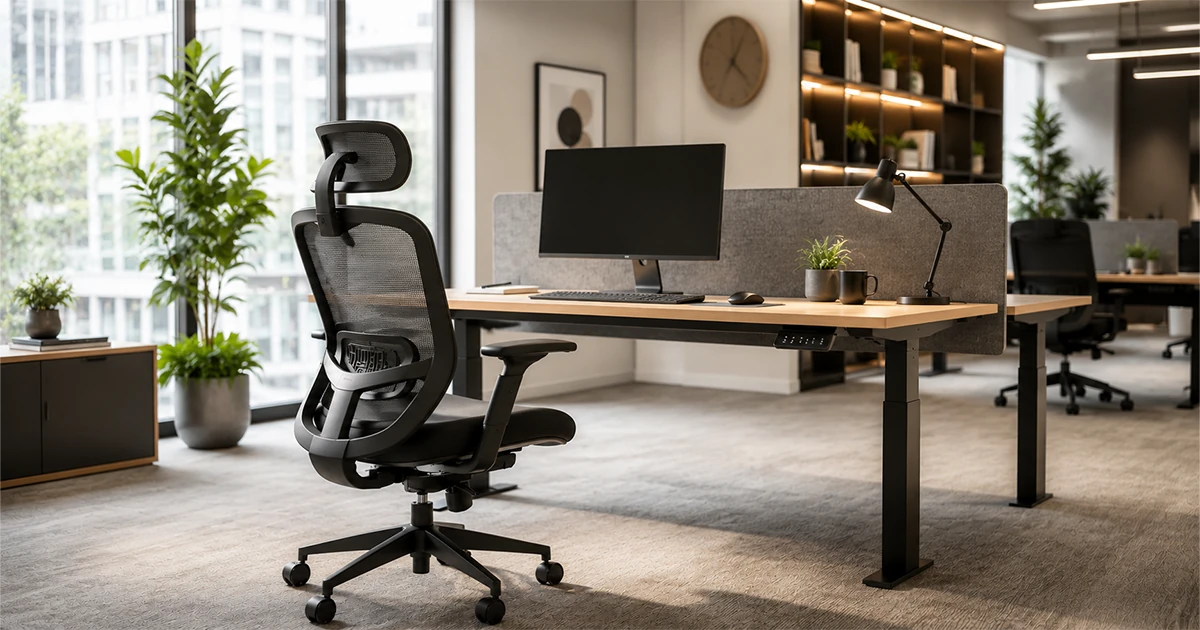
With the chair set, position the monitor so the top of the screen sits roughly at eye level, and the whole screen sits about an arm’s length away. Looking slightly down at a screen is more natural than looking up or straight ahead at a screen set too high.
For laptop-only setups, this usually means adding a stand or external monitor — a laptop screen alone forces the neck into a downward angle for hours, which is one of the most common and most fixable sources of neck strain in an office.
Set the Desk Height to Match the Chair, Not the Other Way Around
Once seated correctly, elbows should sit close to 90 degrees when hands are on the keyboard, with wrists straight rather than bent up or down. If the desk is a fixed height and too tall or short for that position, the chair’s armrests (if height-adjustable) can often close most of the gap.
Keyboard and mouse should sit close enough that reaching for them doesn’t require extending the shoulder forward — a small distance that adds up to real strain over a full work day.
Account for Riyadh’s Light and Heat When Placing a Desk
Desk placement in Riyadh offices needs one more consideration than a typical ergonomics checklist covers: direct sun through windows creates both glare on screens and localised heat at that desk, even with strong air conditioning running elsewhere in the room.
- Position monitors perpendicular to windows rather than facing or backing onto them, to cut glare without losing natural light entirely.
- Where desks must sit near south- or west-facing windows, blinds or window film that cuts direct glare protects both screen visibility and chair material — direct sun also makes upholstery and mesh wear faster near unshaded windows.
A Five-Minute Setup Check Per Desk
For an office rolling this out across many desks, a quick per-desk check catches most issues without a full ergonomics consultation for every seat:
Checkpoint | What "right" looks like |
|---|---|
Chair height | Feet flat on the floor, knees roughly level with hips |
Seat depth | Two to three finger-widths behind the knee |
Monitor | Top of screen at eye level, about an arm’s length away |
Elbows and wrists | Around 90 degrees at the keyboard, wrists straight |
Lumbar support | Touching the lower back, no gap behind it |
Screen glare | None from windows or overhead lighting |
Quick answer: Run this six-point check at every desk during a fit-out or move-in to catch setup problems before they turn into ongoing complaints.
Conclusion
A good workspace setup isn’t complicated, but it is sequential — chair first, then monitor, then desk and keyboard position, with Riyadh’s light and heat factored into where the desk sits at all. Getting the order right takes a few minutes per desk and prevents most of the common complaints before they start.
Why Seatspace Setting up a new office or fit-out? Start with seating that supports the whole setup. Seatspace is a Riyadh-based office-seating specialist — local stock and hands-on support, nationwide delivery through our shipping partner Aramex, secure online checkout via PayTabs, and warranties ranging from 1 to 5 years depending on the chair. |
Setting up seating for a new office or fit-out? Reach out to Seatspace for a project quote and chairs specified to match your workspace layout.
Setting up a single desk? Browse Seatspace’s ergonomic chairs to find one that fits.
About the author SeatSPACE is an office-seating specialist based in Riyadh, Saudi Arabia, supplying and advising on ergonomic chairs for workplaces across the Kingdom. This guide was written and reviewed by the SeatSPACE team. |